
Learning by Ear and Eye: How Audio and Pictures Teach a Six-Year-Old
A child in Class 1–3 is still learning to read. Lessons that are spoken aloud and shown in pictures reach them years before text can. Here is why, and how to use it at home.
Ask a six-year-old to read a paragraph about "the three states of matter" and you will watch them decode letters, not learn science. Ask them to listen to the same idea while looking at a picture of an ice cube, a glass of water and a kettle, and they get it in under a minute. The difference is not intelligence. It is the order in which the brain builds its skills.
Listening comes years before reading
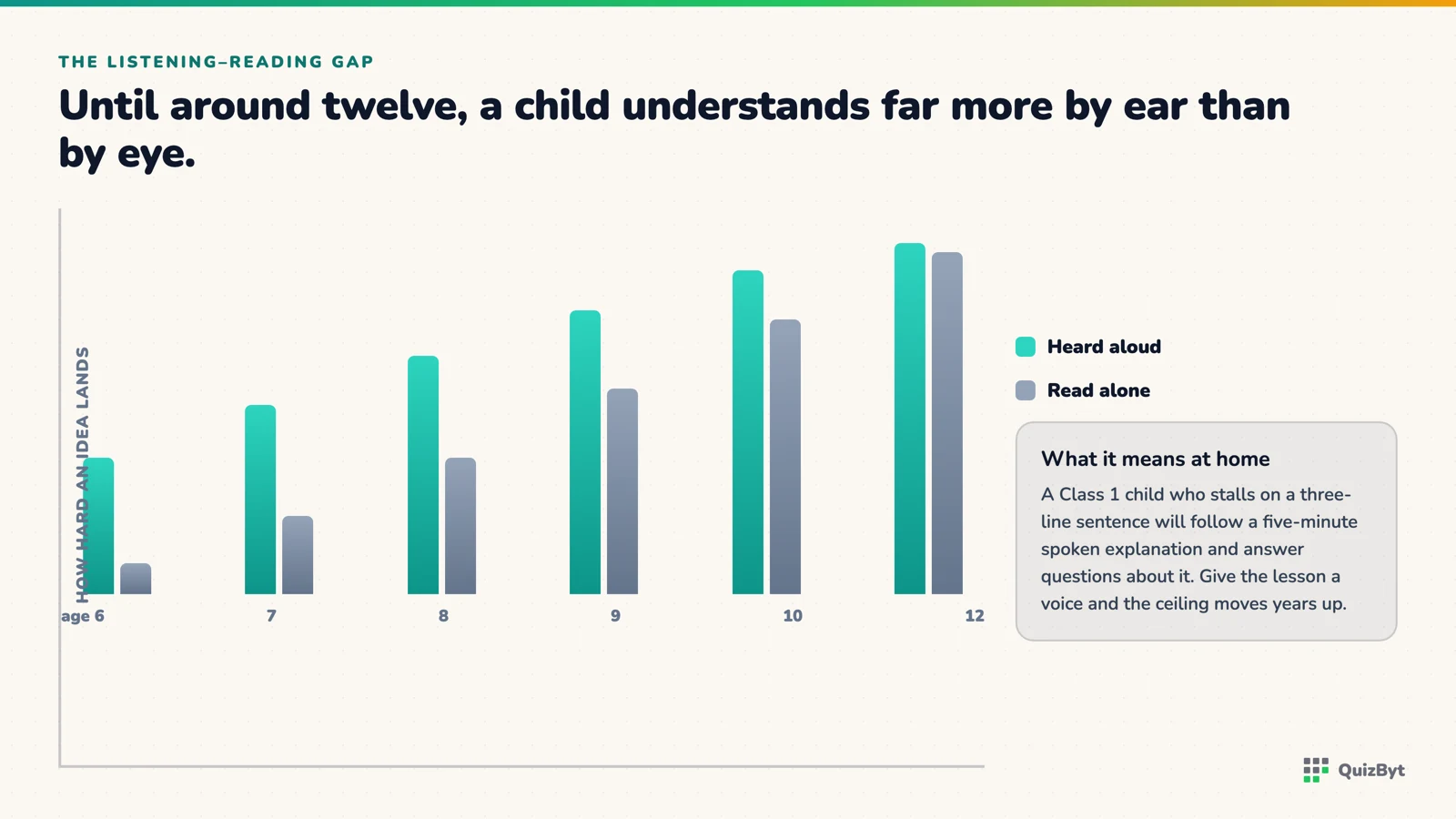
Children understand spoken language long before they can read it. Researchers call the gap the listening–reading gap: until roughly age 12, most children can follow far harder ideas by ear than by eye. A Class 1 child who struggles with a three-line sentence can happily follow a five-minute spoken explanation with questions in it.
So when the only way to learn is reading, early learners are being tested on the skill they have least of, while the subject itself waits. Audio removes that barrier. The child's full attention goes to the idea.
Pictures are how young memory works
Young children remember what they can see. Show a picture of five apples with two taken away and "5 − 2 = 3" becomes a story they can replay in their head. The same sum written as symbols is an abstract code they have to translate first.
The strongest combination is both at once: a picture on screen, a voice explaining it, and one question to answer by tapping. Educational psychologists call it dual coding: two routes into memory instead of one.
What this looks like in practice
- Short scenes, not long pages. One idea, one picture, one question. Five of those beat one twenty-minute lesson.
- The child controls the pace. A "listen again" button is worth more than any amount of explaining, because they press it exactly when they lose the thread.
- Tap to answer, not type. Typing is a motor skill they are still learning; tapping the right picture tests the idea, not the fingers.
- Immediate, kind feedback. A green tick and a "yes, because…" teaches in the moment. A red mark tomorrow teaches nothing.
How QuizByt does it for Classes 1–3
Our lessons for the youngest classes are built exactly this way: large type, one scene at a time, a read-aloud button on every scene, and a tap-to-answer activity before moving on. Quizzes for Class 1–3 have a 🔊 Listen button on every question, so a child who cannot yet read "Is 10 even or odd?" can still answer it. You can try a free lesson without an account.
Reading will come. Until it does, let them learn the way they already can, by ear and by eye.
Responses
Sign in to join the conversation. Responses are open to people with a QuizByt account, which is how we keep this a place you would let your child read.
Loading responses…
Lessons that talk, quizzes that mark themselves, games that make kids think
QuizByt is matched to your child's class. Classes 1–10 and Cambridge O Level. Every subject opens with a free lesson, quiz and worksheet, no account needed.
 The Community's Job: Raising Digital Learners TogetherA child's relationship with screens is shaped by parents, teachers, schools and friends, not by one rule at one kitchen table. What each of them can do, and how a shared platform makes it easier.Read the article →
 Five-Minute Lessons: A Realistic Study Day for a Class 2 ChildForget the hour-long study session. Here is a day of interactive learning for a seven-year-old that actually fits a real family, and why short beats long at this age.Read the article →
 From Paper to Tablet Without Losing the LearningMost school digitisation projects move the paper onto a screen and call it transformation. Here is what actually has to change, and the parts of paper worth keeping.Read the article →