
Screen Time Under Six: What the Research Actually Says
The honest summary is not "screens are bad" or "screens are fine". It is that almost everything depends on what is on the screen and whether an adult is sitting there, and the size of that second effect is startling.
The short version
- The evidence separates passive watching from interactive, educational use. They do not behave the same way in studies.
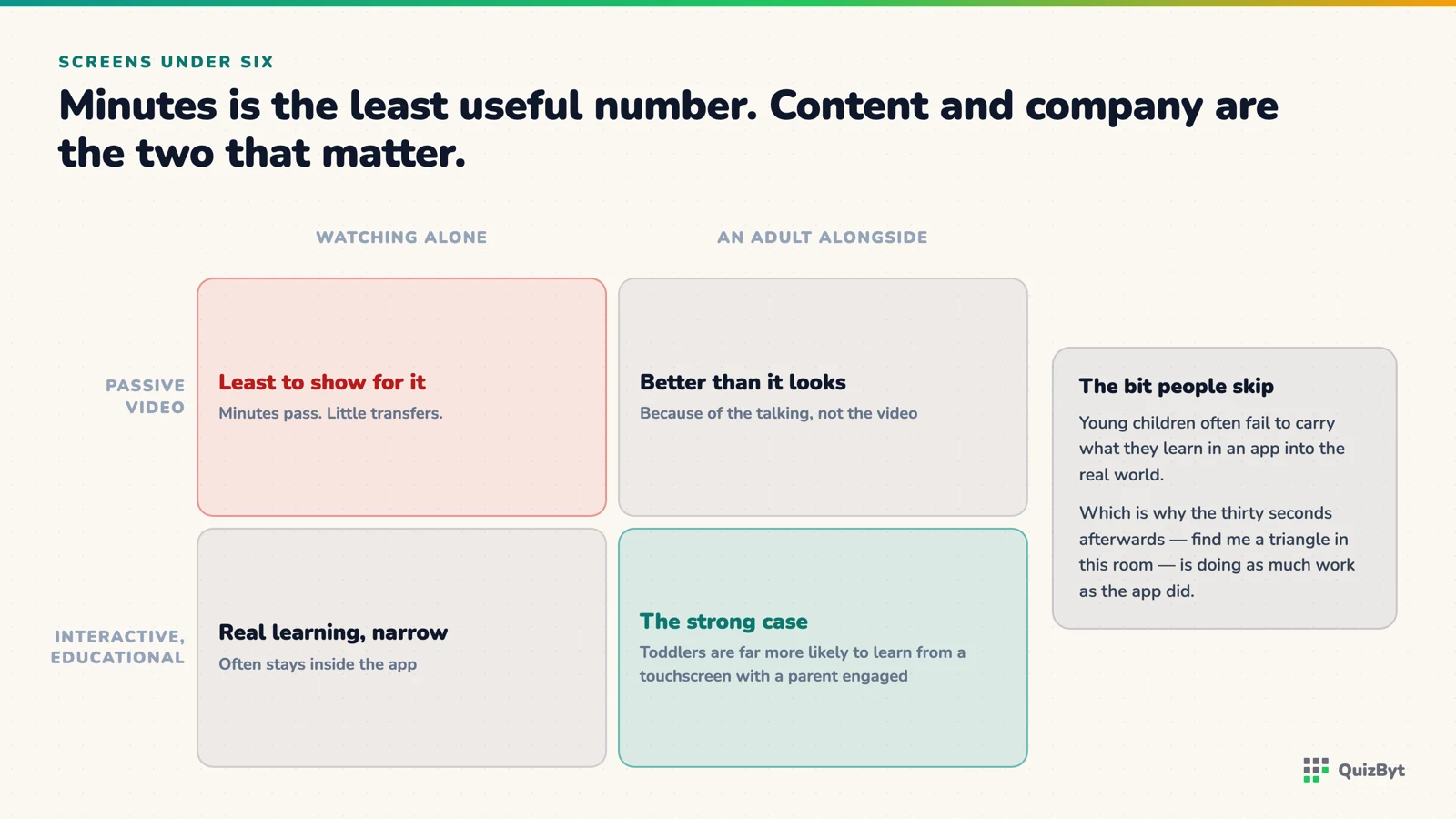
- One widely cited finding is that toddlers are far more likely to learn from a touchscreen when a parent is present and engaged with them.
- Young children often fail to transfer what they learn in an app to the real world, which is why the off-screen follow-up matters.
- Total minutes is the least useful number to argue about; content and company matter more.
Ask the internet how much screen time a four-year-old should have and you will get two confident answers that contradict each other. The research literature is more careful than either, and more useful.
The distinction that changes everything
Most of the alarming findings about screens and young children come from studies of passive consumption: television on in the background, autoplaying video, long unstructured watching. Most of the encouraging findings come from studies of interactive, educational use, often short and often with an adult involved.
A systematic review of interactive screens and language development in children up to six found that several quasi-experimental studies reported a positive association between interactive technology use and language acquisition when used in educational settings, while noting that excessive passive media consumption is associated with the opposite. A broader systematic review of interactive technology use and child development reaches similarly split conclusions depending on type of use.
So "screen time" as a single quantity to be rationed is close to meaningless. Twenty minutes of a tracing app with a parent nearby and twenty minutes of autoplaying video alone are not the same twenty minutes.
The co-viewing effect is the big one
If you take one thing away, take this. Research summarised by KQED's review of the educational app evidence notes that children as young as fifteen months can learn from touchscreens, but were dramatically more likely to do so when a parent was present and the interaction quality was high.
That is not a small adjustment. It is arguably the main finding in the whole area. The adult does things the app cannot: names what is happening, repeats the word a fourth time, asks "where's another one?", connects the screen to the room. Without that, a lot of what is on screen simply does not land.
Which is an awkward conclusion, because the main reason most of us hand over a tablet is to get ten minutes to ourselves. The trade is this: the version that teaches is the version you sit through.
The transfer problem
The finding parents find most surprising is that young children often do not carry learning between the app and the world. Summaries of this literature note that even two-and-a-half to three-year-olds may fail to transfer learning from an app to real life, or from real life to an app.
A child can match shapes perfectly on a tablet and then not recognise the same shape on a biscuit. This is not a failure of the child or necessarily of the app. It is how young cognition works. Context is glued to content at this age.
The practical consequence is simple: the off-screen half is not optional. Trace the letter on screen, then write it on paper. Learn the shape on screen, then find it in the room. Count on screen, then count the stairs.
It is also why our own Kindergarten section pushes hard towards paper, every letter, number, shape and colour has a printable worksheet generated from the same artwork as the screen version, and the lesson cards name real-world objects for every shape and colour so the connection is made out loud.
What a good session looks like
- Short. Five to ten minutes at three or four. The useful attention is gone long before the interest is.
- Chosen, not drifted into. A specific activity you chose, rather than a feed.
- No autoplay. Anything that starts the next thing by itself has removed the child's decision to stop.
- Interactive, not watched. The child is doing something on most screens, not consuming.
- Followed by the real-world version. Same day, same topic, off screen.
- Ended while it is still going well. A session that ends in a meltdown teaches the child that screens are worth fighting over.
What to look for in an app
There is a fuller checklist in how to judge a learning app for a four-year-old, but the short version: no ads, no loot mechanics, no autoplay, no timers, and a child who cannot read must still be able to use it. Anything that keeps a small child on screen through pressure rather than interest is optimising for something other than their learning.
A reasonable position
Not zero. Not unlimited. Short, interactive, chosen sessions of genuinely educational content, with an adult in earshot, followed by the same thing in the real world, and no anxiety about the number of minutes, because that number was never the variable that mattered.
Questions parents ask
How much screen time is safe for a 3-year-old?
Major health bodies suggest limiting recreational screen use in this age group, but the research is clearer about kind than quantity: interactive educational use with an adult present behaves very differently from passive video watching.
Are educational apps actually effective for preschoolers?
Reviews suggest children under six can learn from well-designed interactive apps, with some of the strongest evidence around early maths skills. Quality varies enormously between apps.
Why does watching with my child make such a difference?
Research on touchscreen learning found children were far more likely to learn when a parent was present with high-quality interaction. The adult names, repeats, asks and connects what is on screen to the real world.
My child learns things in an app but cannot do them in real life. Why?
This is a documented effect. Young children often do not transfer learning between an app and the world, in either direction. The fix is to repeat the same activity off-screen the same day.
Responses
Sign in to join the conversation. Responses are open to people with a QuizByt account, which is how we keep this a place you would let your child read.
Loading responses…
Lessons that talk, quizzes that mark themselves, games that make kids think
QuizByt is matched to your child's class. Classes 1–10 and Cambridge O Level. Every subject opens with a free lesson, quiz and worksheet, no account needed.
 How to Judge a Learning App for a Four-Year-Old: Seven TestsEvery app in the education category says it is educational. Seven checks, none of which take more than a minute, will tell you whether this one is built for your child or for your attention.Read the article →
 Screen Tracing vs Pencil on Paper: What the Brain Research Actually ShowsA finger on glass and a pencil on paper are not the same activity. The research is clearer than most app marketing admits, and it points to using both, in a particular order.Read the article →
 A Migration Plan From Google Classroom to QuizByt, in Five StepsDo not switch everything on a Monday. Move the test, then the practice, then the lessons, keep Classroom for announcements, and decide at the end of term whether you still open it.Read the article →