
How to Judge a Learning App for a Four-Year-Old: Seven Tests
Every app in the education category says it is educational. Seven checks, none of which take more than a minute, will tell you whether this one is built for your child or for your attention.
The short version
- "Educational" is a store category, not a standard. Nobody checks it.
- The fastest quality test is whether a child who cannot read can use it without help.
- An app with no natural stopping point is designed for session length, not learning.
- Good feedback says why an answer was right, not only that it was.
"Educational" is a category in an app store. It is not a claim anyone verifies. A game where a cartoon animal shouts encouragement while a child taps randomly is filed in exactly the same place as a carefully sequenced phonics programme.
Here are seven tests. Together they take about five minutes, and you run them on the app, not on your child.
1. Can a child who cannot read use it alone?
Open it and try to use it without reading a single word. Can you tell what to do? Is there a spoken instruction, or an obvious visual one?
An app for four-year-olds with written menus, a written settings screen and written feedback has been designed by someone who forgot who was holding the device. It will require a parent for every step, which is fine if that is the plan and useless otherwise.
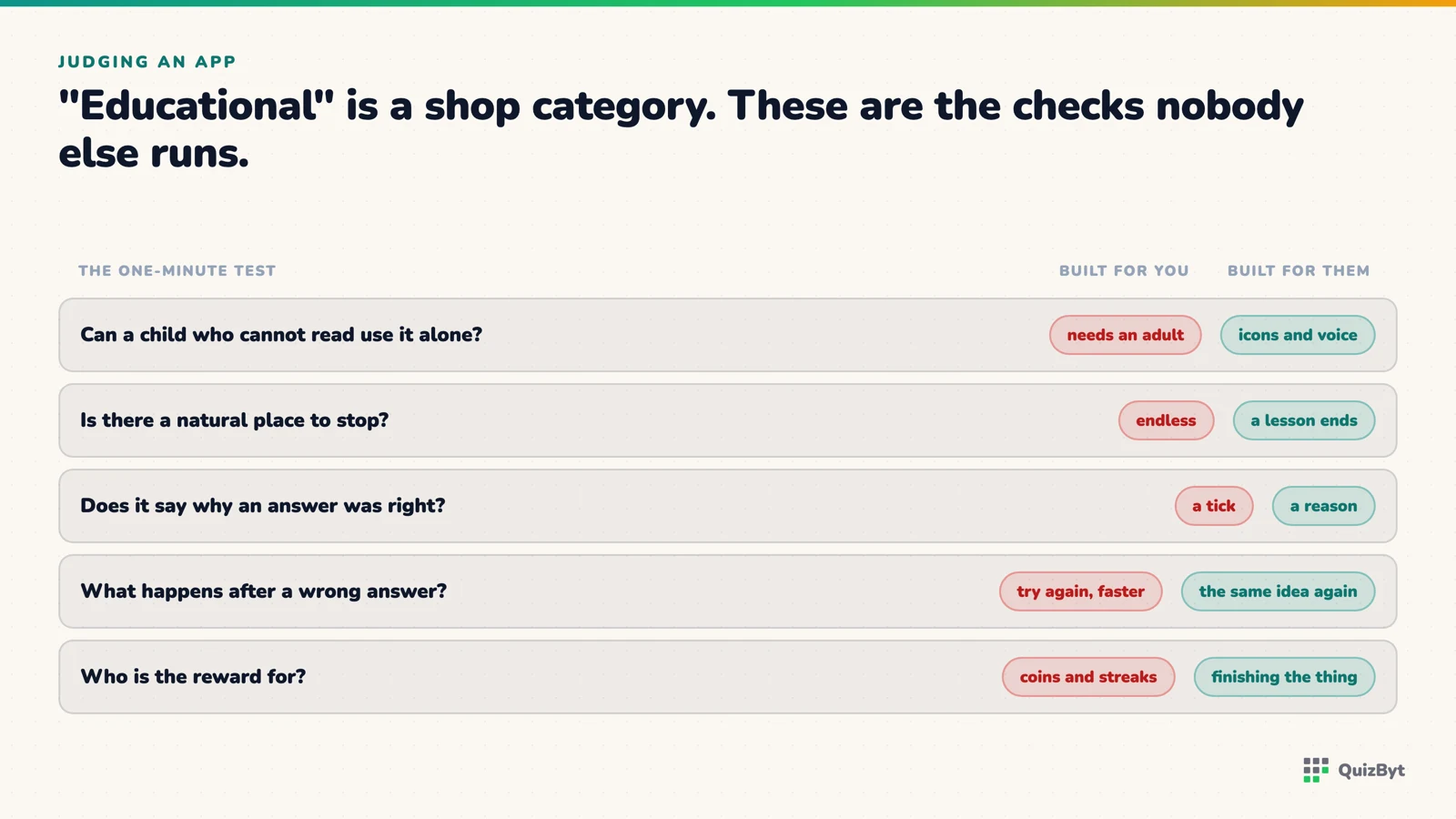
2. What happens on a wrong answer?
Give a wrong answer. Three possible outcomes:
- A red buzzer and a lost life. Bad. At four, that teaches that trying is risky.
- Nothing: it just moves on. Also bad. The mistake is the teachable moment and it has been thrown away.
- A gentle retry, then a hint, then the answer with a reason. Good. This is what a decent human teacher does.
Best of all is an app that says why: "the other three are red." A child who hears the reason has learned something; a child who hears a chime has learned that chimes are nice.
3. Is there a natural place to stop?
Play for two minutes and look for the end. Does an activity finish? Is there a moment that says "done"?
Endless scrolls, autoplaying next levels and streak counters exist to extend sessions. An app that is confident in what it teaches is happy for a child to finish in four minutes. An app that needs thirty minutes a day is optimising for something that is not your child's learning.
4. What does it do with attention when the child stops?
Close the app. Does it send a notification an hour later? Does it have a character who is "sad" that you left? Does it have a streak that will "break"?
These are retention mechanics designed for adults and applied to four-year-olds, who have no defences against them at all. A daily streak on a child's learning app is a manipulation, not a motivation.
5. Ads and purchases
Any advertising in an app aimed at pre-readers is a problem, because a four-year-old cannot distinguish an ad from content and cannot evaluate a purchase prompt. A child who taps everything on screen will tap the ad.
Check specifically: are there ads between activities? Does a locked item sit next to an unlocked one in a way a child will tap? Is a purchase ever more than one tap away from a child's finger?
6. Is the content actually correct?
This catches more apps than people expect, especially in the earliest content. Look at:
- The lowercase "a" and "g". Are they the single-storey handwriting forms schools teach, or the two-storey printing forms fonts supply? Most apps get this wrong, the detail is in this article.
- Letter sounds. Does it say /m/ or "muh"? The added vowel makes blending much harder. See letter names or letter sounds.
- Shapes. Is every triangle equilateral and sitting on its base? A child who only sees those often rejects a long thin triangle as not one.
- Counting. Does it ask "how many?" about real groups of things, or only show numerals in isolation?
7. Does it point off the screen?
The best test of all, and the rarest quality.
Young children frequently do not transfer what they learn in an app to the real world, a documented effect covered in what the research says about screens under six. An app that ignores this is only teaching the app.
So: does it suggest anything to do off screen? Does it print? Does it connect a shape to a real object, a number to real things, a letter to a pencil? An app that actively sends your child away from it has understood what it is for.
The five-minute version
- Use it without reading. Could you?
- Get one wrong. What happened?
- Find the end of an activity. Is there one?
- Close it. Does it chase you?
- Look for ads and purchase buttons at a child's fingertip.
- Check the "a", the "g" and a letter sound.
- Ask: what does this want my child to do when the screen is off?
We built the QuizByt Kindergarten section against this list: no ads, no purchases reachable by a child, no timers, no streaks, no autoplay, a read-aloud voice that is off until someone turns it on, letters drawn in the forms schools teach, and a printable worksheet for every single activity, because the intended end of a session is a child at a table with a pencil.
Judge it by the seven tests. That is what they are for.
Questions parents ask
Are free kids' apps safe?
Many are, but free usually means the revenue comes from ads or purchases, and both are aimed at a person who cannot evaluate them. Check what a wrong tap does before handing a device over.
What makes a preschool app genuinely educational?
A clear thing being taught, feedback that explains rather than just scores, no reading requirement for a pre-reader, a natural end, and content that connects to the real world.
Should a learning app for a 4-year-old have timers?
Generally no. Timed challenges suit older children; at four they mostly teach a child to rush and to feel bad, and they measure speed rather than understanding.
How do I know if my child is actually learning from an app?
Ask for the same skill off-screen the same day. If they can find a triangle in the room or count four forks, it transferred. If not, the app is entertainment.
Responses
Sign in to join the conversation. Responses are open to people with a QuizByt account, which is how we keep this a place you would let your child read.
Loading responses…
Lessons that talk, quizzes that mark themselves, games that make kids think
QuizByt is matched to your child's class. Classes 1–10 and Cambridge O Level. Every subject opens with a free lesson, quiz and worksheet, no account needed.
 Games That Make Kids Think: Puzzles, Memory and Logic as HomeworkNot every game is a waste of time. Some train exactly the skills schoolwork runs on, working memory, planning, deduction. Here are the kinds worth a place in the study routine, and why.Read the article →
 Screen Time Under Six: What the Research Actually SaysThe honest summary is not "screens are bad" or "screens are fine". It is that almost everything depends on what is on the screen and whether an adult is sitting there, and the size of that second effect is startling.Read the article →
 QuizByt vs Google Classroom: What Each One Actually DoesThey are not the same kind of tool, and pretending otherwise helps nobody. Classroom is a place to hand things out; QuizByt is a place where the work marks itself. Here is exactly where they overlap and where they do not.Read the article →