
QuizByt vs Google Classroom: What Each One Actually Does
They are not the same kind of tool, and pretending otherwise helps nobody. Classroom is a place to hand things out; QuizByt is a place where the work marks itself. Here is exactly where they overlap and where they do not.

The short version
- Google Classroom distributes work and collects it; the marking, the practice and the progress record are mostly left to the teacher.
- QuizByt starts where Classroom stops: quizzes that mark themselves, three difficulty levels per topic, and a per-topic record for every student.
- QuizByt has no announcements stream, no term calendar and no document storage; if a school lives on those, it should keep Classroom for them. Live classes are covered: QuizByt schedules Zoom classes on a class calendar.
- Most schools that switch keep both for a term, then find Classroom is only being opened for announcements.
Schools ask us this in one of two forms. Either "can we replace Google Classroom with QuizByt?" or "why would we, when Classroom is free?" Both deserve a precise answer rather than a sales one, so this is the comparison feature by feature, including the parts where QuizByt simply does not compete.
What Google Classroom is
Classroom is a distribution and collection system. A teacher posts an announcement or an assignment, attaches a document, sets a due date, and students hand work back. Grading happens in a grid the teacher fills in. Its own documentation describes it as a way to "create, distribute and grade assignments", and that is exactly what it is.
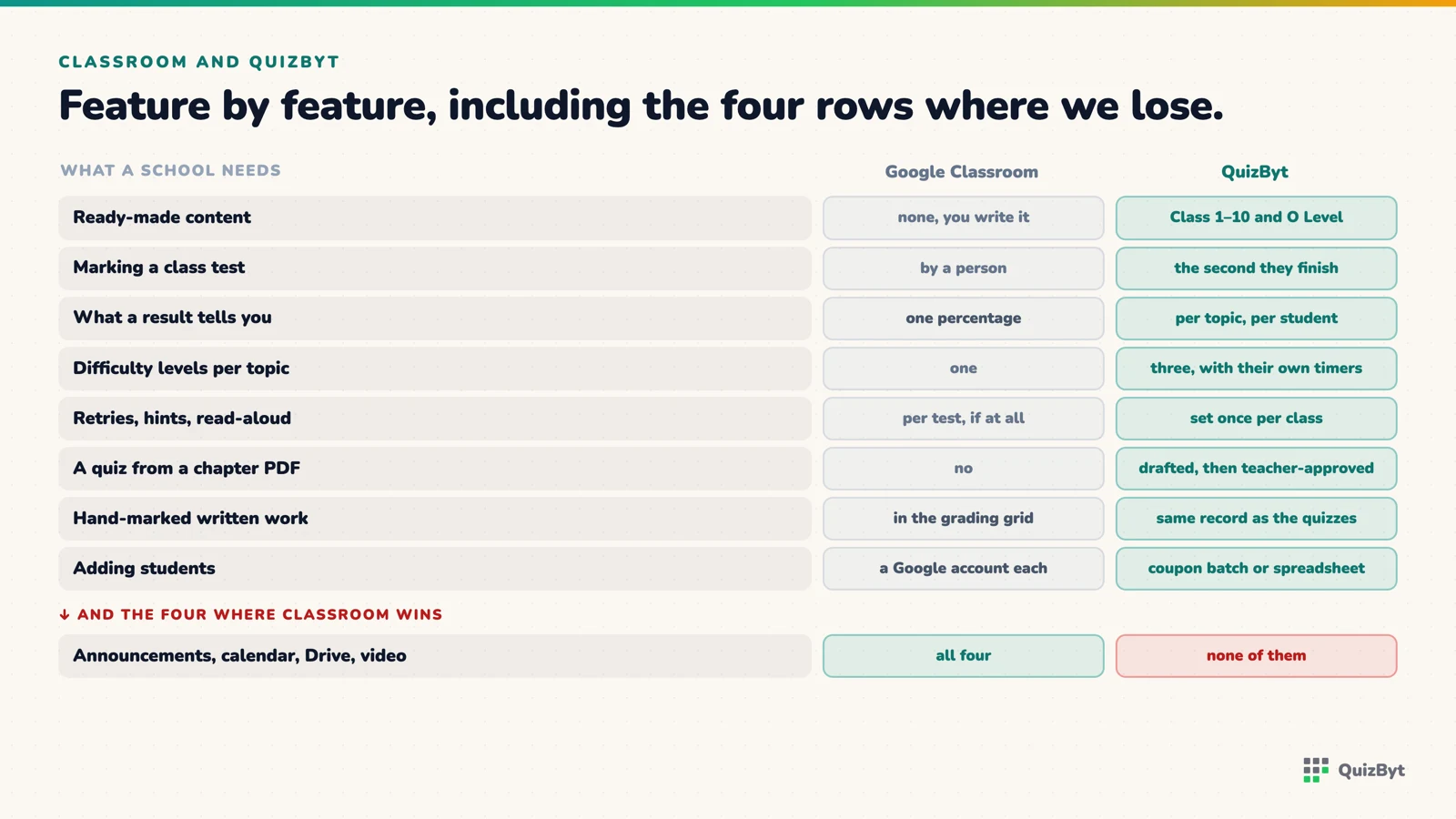
What it does not do is the work in between. A worksheet posted to Classroom is still a worksheet: a student fills it in, the teacher marks it, and the class finds out on Thursday what it got wrong on Monday. Classroom has quiz-style forms, but the questions come from the teacher, one at a time, and there is no notion of a topic having three difficulty levels or of a student's weak topics across a term.
What QuizByt is
QuizByt starts where Classroom stops. Every topic in its catalogue already has quizzes at three levels, worksheets, and a lesson that advances one idea at a time. When a teacher assigns a quiz to one student, several, or a whole class, it marks itself the moment each student finishes, and the result is recorded per topic, so "68% in Science" becomes "two of six on electric circuits, for eleven students".
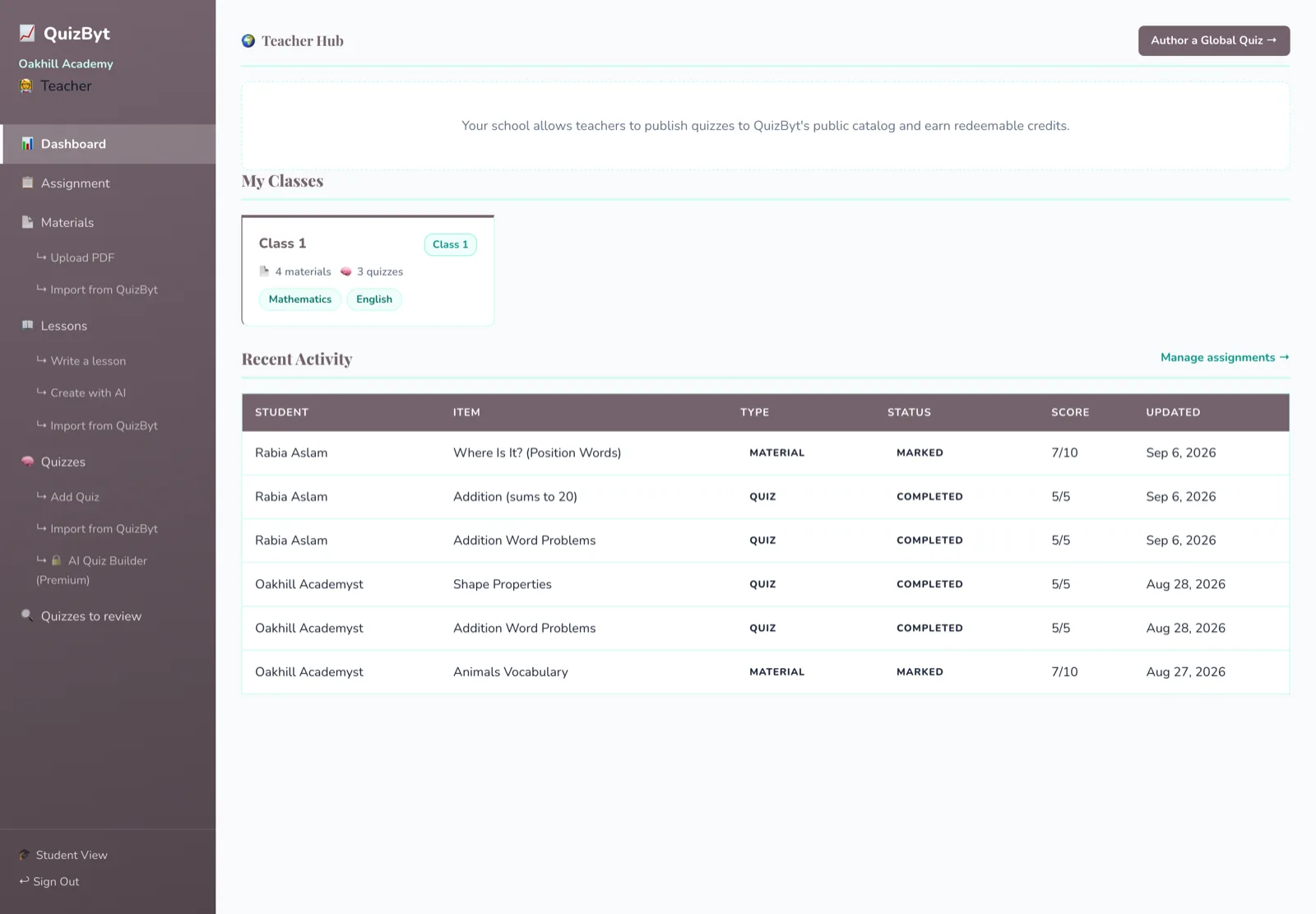
The school portal carries what a school needs to run that: classes, teachers, branches, coupon onboarding, bulk student import from a spreadsheet, the school's own materials and quizzes, and an assignment board with due dates, hand-marked uploads and an optional full-screen mode for tests. Progress is a report a teacher opens, not a grid they fill in.
What you get that Classroom does not have
Point by point, these are the things a school is paying for. Everything listed here exists today; the section after this one is the list of things we do not have at all.
- A catalogue, not an empty shell. Classes 1 to 10 plus Cambridge O Level, with a lesson, three quiz levels and a printable worksheet per topic. Classroom starts empty and stays as full as your teachers make it.
- Quizzes that mark themselves. The moment a student presses finish. Not that evening, not on Thursday.
- Per-topic results instead of one percentage. "68% in Science" becomes "two of six on electric circuits, for eleven students", which is a lesson plan rather than a number.
- Three difficulty levels on every topic. Easy, medium and skilled, with their own timers of fifteen, ten and seven minutes. Differentiating across a class costs no extra preparation.
- Rules set once per class, not per test. Retries and how many, hints on or off, read-aloud on or off. Every assignment inherits them, so no teacher has to remember.
- An answer key that waits. It stays shut while an attempt remains and opens at 80% or on the last try, so a retry is a retry rather than a copy.
- Read-aloud on questions. A Class 1 child can answer a question they cannot yet read, which is the difference between testing science and testing reading.
- A quiz drafted from a chapter PDF. Upload it, pick the class, subject, level and anything from three to twenty questions, and edit the draft. It is saved to your own quiz list and a teacher approves it before a student sees it. This one is on the Premium school plan.
- Import from our catalogue, or write your own. Both on every plan, and most schools use both: import the standard syllabus, author the parts you teach differently.
- Peer review for teacher-written quizzes. Two other teachers approve before publication, one rejection sends it back, and reviewing earns credits.
- Hand-marked work in the same record. A student uploads written method, a teacher scores it out of a maximum they set, and it sits beside the auto-marked quizzes rather than in a separate pile.
- Onboarding that is not one account at a time. A class coupon batch, or a CSV or XLSX import. A school is set up in a day.
- Branches under one school. For a group running more than one campus.
- Reports built from a term of work. Completion and score reported separately, per topic, from assignments students actually did.
- A reason for a child to come back. Credits earned only by passing quizzes, which open games matched to the child's class band, inside windows and a daily cap an adult sets once behind a PIN.
- No advertising, ever. Student data is not used to sell anything, to anyone.
Where they overlap
- Setting work. Both do it. Classroom to a class; QuizByt to a class, a group or one student, with a due date.
- Collecting work. Both. In QuizByt a quiz collects and marks itself; an uploaded piece of work is marked by hand with a score out of a maximum the teacher sets.
- Teacher and student accounts per class. Both, though QuizByt's students are added by coupon or import rather than by a Google account.
Where QuizByt does not compete
This is the part a school should read twice. QuizByt has:
- No announcements stream. There is no place to post "no school on Friday".
- No term calendar. Each class has a week calendar of its online classes, and due dates exist on assignments, but there is no calendar of events across a term.
- No document storage. Materials are uploaded to the portal, but there is nothing like Drive.
One thing that used to be on this list is not any more. Since October 2026 teachers schedule live Zoom classes from the class page: QuizByt creates the meeting, emails the students and shows a "Join now" button on their dashboard. There is still no library of recorded video lessons.
If a school's daily use of Classroom is those three things, QuizByt does not replace it. It replaces the part where work is set, done, marked and tracked, which for most schools is the part that costs teacher hours.
What schools actually do
The pattern we see is a term with both. Teachers keep posting announcements in Classroom and move the weekly test, then the practice, then the lessons into QuizByt. By the end of the term Classroom is being opened for announcements and not much else, and the school decides whether that is worth a second login.
The next article covers what the switch changes for a teacher's week, and the one after is the migration plan itself. For the wider question of what to move online first, see from paper to tablet without losing the learning.
Questions parents ask
Can QuizByt fully replace Google Classroom?
For assignments, quizzes, marking and progress, yes. For announcements, a term calendar and shared documents, no. QuizByt does not do those, and a school that relies on them should keep Classroom alongside. Live video classes it does cover, through Zoom.
Does QuizByt integrate with Google Classroom?
No. There is no sync between the two. Students are onboarded to QuizByt with a class coupon or a bulk import, and results live in QuizByt.
Which is cheaper?
Google Classroom is free with a Workspace for Education account. QuizByt is a paid school plan. The comparison worth making is against the teacher hours spent marking and building practice material, which Classroom does not reduce.
What does a teacher see in QuizByt that they do not see in Classroom?
Per-topic scores for every student, which topics a whole class is weak on, and quiz results the moment a student finishes, without marking anything.
Responses
Sign in to join the conversation. Responses are open to people with a QuizByt account, which is how we keep this a place you would let your child read.
Loading responses…
Lessons that talk, quizzes that mark themselves, games that make kids think
QuizByt is matched to your child's class. Classes 1–10 and Cambridge O Level. Every subject opens with a free lesson, quiz and worksheet, no account needed.
 A Level: Independent Study That Actually WorksA Level removes the supervision. Students who built self-testing years earlier barely notice; students who relied on being told what to revise struggle regardless of ability.Read the article →
 Replacing Google Classroom for Quizzes, Marking and ProgressThe hour a teacher spends marking a class test is the hour Classroom never gave back. What a teacher's week looks like once the test marks itself and the weak topics are already on a screen.Read the article →
 Games That Make Kids Think: Puzzles, Memory and Logic as HomeworkNot every game is a waste of time. Some train exactly the skills schoolwork runs on, working memory, planning, deduction. Here are the kinds worth a place in the study routine, and why.Read the article →