
What to Look For in a Learning App for a Five-Year-Old
Most apps for this age are built to be opened again, not to teach. The difference is visible in about two minutes if you know where to look. Seven things to check, and the reason behind each one.
The short version
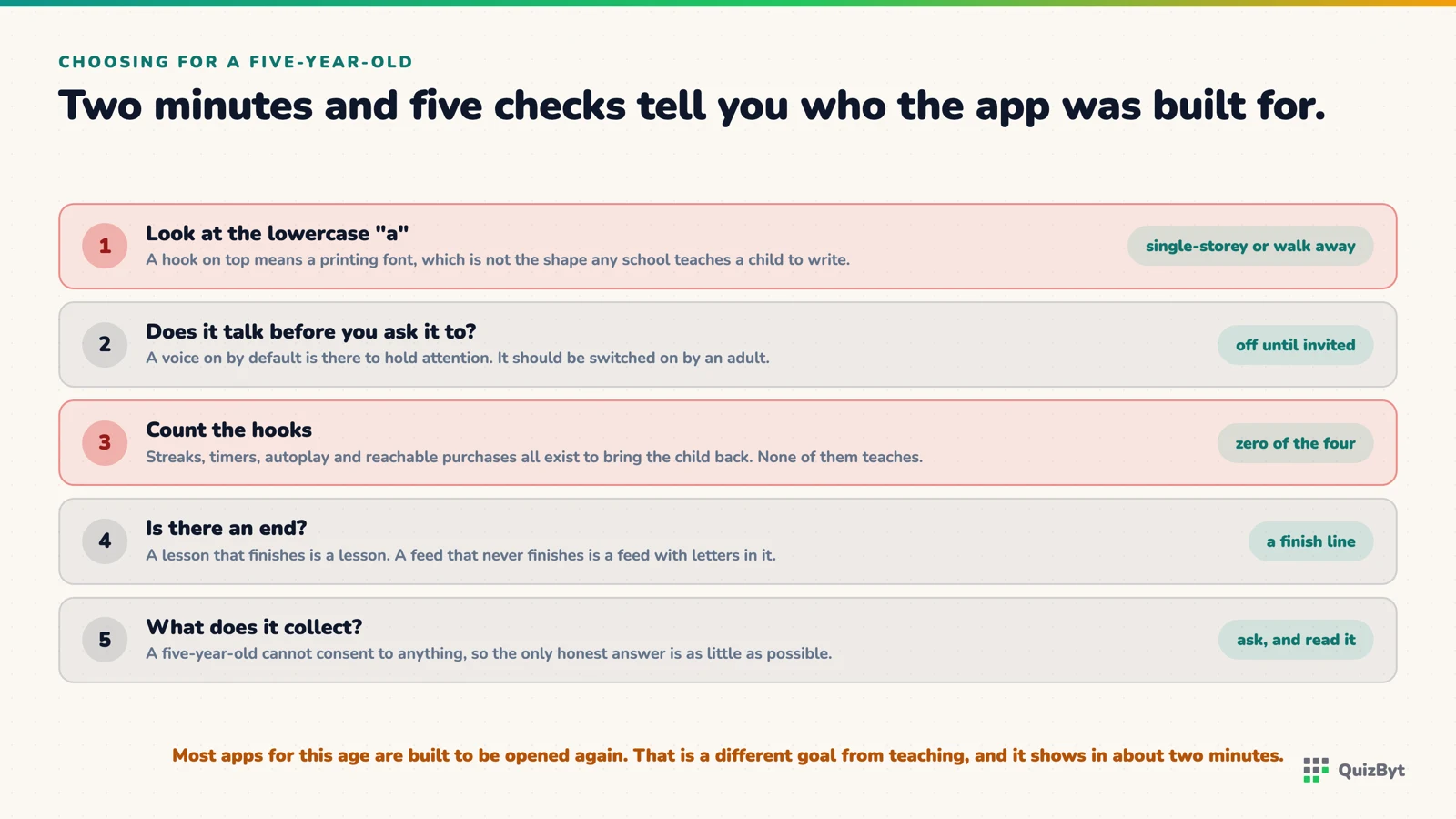
- Check the lowercase a. If it has a hook on top, the app is showing a printing font no school teaches a child to write.
- A voice should be off by default and switched on by an adult. An app that talks the moment it opens is designed to hold attention, not to teach.
- No streaks, no timers, no autoplay, no purchases a child can reach. Each of those exists to bring the child back, and none of them teaches anything.
- Ask what it collects. A five-year-old cannot consent to anything, so the honest answer is "as little as possible".
Open any app store and search for "kindergarten learning". You will get hundreds of results with bright icons and four-star ratings, and most of them are built for one purpose, which is to be opened again tomorrow. Some also teach. Telling the two apart takes about two minutes, if you know where to look.
1. Look at the lowercase a
Find the letter a in the app. If it has a curved bowl with a hook arching over the top, the app is showing you a printing font. No school teaches a child to write that letter; they teach the round single-storey one. An app that shows a shape the child will never be asked to make is a colouring book with letters on it. The reason this happens is an accident of software, not a decision, but it matters all the same.
2. Is the voice off when it opens?
An app that starts talking the moment it launches is designed to catch attention. One that waits for an adult to switch the voice on is designed to be used with an adult in the room. The second is the one you want at this age, and it is rarer than it should be.
3. Count the hooks
Streaks. Daily chests. A timer counting down. "Come back tomorrow for a surprise." Each of these exists to bring the child back and none of them teaches anything. An activity built to teach has an end: the letter is traced, the shapes are sorted, done. If the app fights the ending, it is not on your side.
4. Can a child reach a purchase or an advert?
Tap around as a five-year-old would, fast and everywhere. If you land on a shop or an advert, so will they. At this age the only acceptable answer is that neither exists in the child's part of the app at all.
5. What does a wrong answer do?
A red buzzer and a sad face teach a child that being wrong is unpleasant, which is the last thing you want them to learn at five. The better pattern: the wrong tap does nothing dramatic, the right one is celebrated, and where possible the reason is shown. "This one is round, the others have corners" teaches. "Wrong!" does not.
6. Does it ask why?
The best early-logic activities, odd-one-out and what-comes-next, are only as good as the explanation that follows the answer. An app that shows a tick and moves on has skipped the learning. One that says which property made the answer right has done the teaching.
7. What does it collect?
A five-year-old cannot consent to anything. Read the privacy page, and if there is not one written for a parent in plain language, that tells you enough. The honest answer to "what do you collect about my child" is "as little as possible, and never for advertising".
How the QuizByt Kindergarten section measures up
We built the Kindergarten playground against this list, so it is fair to be checked against it. Letters and numbers are drawn from stroke data, not a font, so the shapes are the ones schools teach. The voice is off until a grown-up turns it on. There are no streaks, no timers, no purchases and no advertising in the children's section. Odd One Out shows the reason after every answer. It is free, works without an account, and collects nothing from a child who is not signed in. The week-by-week plan says how to use it.
Questions parents ask
How much screen time is right for a five-year-old?
Less than most apps are designed for, and the design is the problem. A well-built activity has an end: a letter traced, a quiz finished. Look for apps where a session naturally closes rather than continues.
What should a letter-tracing app get right?
The shapes and the stroke order schools teach. Most apps render letters in a printing font, so the lowercase a has a hook on top, which no child is taught to write. The letters should start where the pencil starts and go the way it goes.
Should the app have rewards?
Rewards tied to the activity, yes: a star for tracing the letter well. Rewards tied to returning, no: streaks, daily chests, timers. The first kind reinforces the learning; the second kind reinforces the app.
Is the QuizByt Kindergarten section free?
Yes, and it works without an account. Letters and numbers drawn from stroke data, counting, first words, shapes and colours, and two thinking games, for ages 2 to 6, with the voice off until a parent turns it on.
Responses
Sign in to join the conversation. Responses are open to people with a QuizByt account, which is how we keep this a place you would let your child read.
Loading responses…
Lessons that talk, quizzes that mark themselves, games that make kids think
QuizByt is matched to your child's class. Classes 1–10 and Cambridge O Level. Every subject opens with a free lesson, quiz and worksheet, no account needed.
 One Account, Three Children: Homeschooling Siblings at Different StagesA Kindergartener, a Class 4 child and a Class 9 student in one house need three completely different mornings. How one yearly plan carries all three, each with their own class, dashboard and PIN, and siblings at half price.Read the article →
 How to Choose an Online Quiz System for Your School: Twelve Questions to AskEvery vendor demo shows a quiz being taken. Almost none shows what happens the next morning. Twelve questions that separate a quiz system a school will still be using in a year from one it will quietly abandon.Read the article →
 Practice Testing: Why a Quiz Beats Reading the Chapter AgainOf ten common study techniques reviewed across hundreds of studies, only two were rated high utility. Re-reading and highlighting were not among them. Here is what was, and why.Read the article →